
Features
Classroom Events That Actually Work: Ideas, Planning & Impact


Classroom events are intentional gatherings inside or around a class that turn learning into a shared experience. Morning meetings and project exhibitions to family STEM nights and student-led showcases.
They work when they have a clear purpose, realistic logistics, and roles for students beyond “sit and watch.” They fail when they become decorative interruptions with heavy teacher labor and little academic or community payoff.
If you are a teacher, coordinator, or school leader searching for classroom events that actually improve engagement. This guide gives you types, timelines, templates, and decision rules — not just a random list of themes.
Background: What Classroom Events Really Are?
A classroom event is more than a party with posters.
It is a planned break from default lesson flow that creates a public or semi-public moment of learning. That moment might last 10 minutes (a structured circle) or 2 hours (a family night). What defines it is purpose + audience + participation.
Schools use classroom events to:
- Make student thinking visible
- Build belonging and peer respect
- Invite families into curriculum, not only into seats
- Practice communication, leadership, and collaboration
- Celebrate progress without emptying instructional goals
Education practice has long supported active, participatory learning structures. When students explain, host, demonstrate, or teach, motivation and ownership often rise compared with work submitted only to a teacher. Family partnership research also stresses that events tied to learning — not only entertainment — help caregivers support students at home.
The modern challenge is not inventing more events. It is choosing fewer, better ones that fit real constraints: time, energy, equity, and curriculum maps.
The Classroom Events Spectrum
Think of events on a continuum of scale.
Micro-events (daily or weekly)
Examples:
- Morning meeting / closing circle
- Two-minute expert shares
- Peer appreciation rounds
- Mini debate sparks
These are culture engines. They cost little and compound over months.
Meso-events (unit culminations)
Examples:
- Portfolio walk
- Poetry café
- Classroom museum
- Student-led unconference
- Design challenge day
These convert unit work into audience-ready products.
Macro-events (family or multi-class)
Examples:
- Family math/STEM night
- Cultural fair with student hosts
- Grade-level exhibition
- Community resource + curriculum evening
These require coordination, communication, and stronger logistics.
A healthy annual plan mixes all three, with micro-events carrying most of the relationship load.
High-Value Classroom Event Categories
1) Community-building events
Goal: belonging, norms, voice
Formats: circles, collaborative games, classroom rituals, buddy events
Success signal: more students initiate positive peer interactions afterward
2) Academic exhibition events
Goal: authentic audience for real work
Formats: gallery walks, poster symposiums, demo days, reading celebrations
Success signal: higher-quality final products and better student explanations
3) Family learning events
Goal: partnership around curriculum
Formats: stations where adults and children build/solve together
Success signal: families leave with strategies they can reuse at home
4) Student-led leadership events
Goal: agency and facilitation skills
Formats: unconferences, student workshops, peer teaching fairs
Success signal: students can run segments with minimal teacher rescue
5) Cultural and identity-affirming events
Goal: representation and mutual understanding
Formats: multilingual showcases, heritage projects co-planned by students
Success signal: many cultures appear across the year, not in one token week
6) Review-and-challenge events
Goal: retrieval practice with energy
Formats: escape rooms, quiz relays, simulation markets
Success signal: improved recall without pure entertainment drift
Original Planning Framework: PURPOSE → ROLES → FLOW → PROOF
Most event guides start with decorations. Start here instead.
PURPOSE
Write one sentence: “By the end of this event, students will ____.”
Examples:
- explain their prototype decisions to visitors
- teach a family member one strategy for multi-digit multiplication
- facilitate a 10-minute peer discussion on a text theme
ROLES
List every human job:
- student hosts, timers, translators, tech leads, greeters
- teacher facilitator
- volunteer support
- family participants
If students have no meaningful roles, the event is a show, not a learning structure.
FLOW
Draft a minute map:
- arrival
- launch
- rotations/performances
- buffer
- closing reflection
PROOF
Decide evidence:
- reflection exit tickets
- photo of process boards (with permission)
- family feedback
- rubric snapshots
This framework prevents “busy but empty” events.
A 6-Week Timeline for Bigger Classroom Events
1st Week: Align and approve
- Connect to standards/unit goals
- Check calendar conflicts
- Request space and admin support
- Draft budget ceiling
2nd Week: Communicate and recruit
- Send multilingual invitations early
- Collect constraints (allergies, access needs, timing)
- Assign student leadership teams
3rd Week: Build the learning product
- Students create artifacts, stations, or scripts
- Differentiate pathways for support and extension
4th Week: Rehearse logistics
- Practice transitions
- Test tech and signage
- Prepare quiet/alternate participation options
5th Week: Finalize operations
- Confirm volunteers
- Print run-of-show
- Prep materials in labeled bins
6th Week: Host + reflect
- Execute
- Capture feedback
- Debrief with students the next class day
For micro-events, compress this into a repeatable routine rather than a project plan.
Practical Event Blueprints You Can Steal
A Blueprint: 20-Minute Morning Meeting Event
- Greeting (2 min)
- Share prompt (6 min)
- Quick group activity tied to content (8 min)
- Announcement + intention for the day (4 min)
Why it works: predictable container, novel content.
B Blueprint: Classroom Exhibition (60–90 min)
- Visitor welcome by student greeters
- Gallery open with student docents
- Two scheduled “artist talks”
- Feedback sticky notes
- Class reflection next day
Pro move: post the unit driving question at the entrance.
C Blueprint: Family STEM/Math Night (75–100 min)
- Welcome and purpose
- Station rotations (10–12 minutes each)
- Adult-child team challenges
- Take-home strategy card
- Optional raffle tied to completed stations
Pro move: stations usable by mixed ages and languages through visuals.
D Blueprint: Student-Led Unconference (1 class period or more)
- Students pitch session topics
- Peers choose sessions
- Student facilitators run discussions
- Whole-class synthesis
Pro move: teach facilitation norms before the day.
Inclusion and Equity: Non-Negotiables
Classroom events can unintentionally exclude through timing, language, cost, or participation style.
Design checklist:
- Invitations in families’ preferred languages
- Multiple ways to contribute (not only public speaking)
- Sensory-friendly spaces or quiet alternatives
- Clear food policy and allergy protocol
- No expensive costume/material requirements
- Options for families who cannot attend in person (video walkthrough, take-home kit, morning version)
- Representation planned across the year, not only heritage months
Equity is logistics, not only intention.
Classroom Management During Events
High-energy events fail when expectations are improvised.
Set these in advance:
- entry and exit routes
- voice levels by zone
- signal for freeze/attention
- job badges for student leaders
- what to do when a station finishes early
- adult volunteer instructions on one page
Rehearse transitions once. The rehearsal is part of learning.
Assessment Without Killing the Joy
You can collect evidence without turning the event into a test theater.
Options:
- student self-reflection prompts
- peer feedback protocols
- photo of iterative design process
- short host script rubric (clarity, accuracy, audience awareness)
- family “one strategy I’ll try at home” cards
Keep rubrics short. Events should reveal learning, not drown it in paperwork.
Common Mistakes and How to Fix Them
- Mistake 1: Too many events, too little recovery
Fix: Cap major events per term; protect teaching weeks. - Mistake 2: Teacher performs, students observe
Fix: Require student-facing roles in the run-of-show. - Mistake 3: Family night with no learning task
Fix: Every station teaches one transferable skill. - Mistake 4: Starting decoration before content quality
Fix: Lock artifacts first, aesthetics second. - Mistake 5: Ignoring accessibility until complaints appear
Fix: Build access into the first planning meeting. - Mistake 6: No closing reflection
Fix: Next-day debrief is mandatory. - Mistake 7: One long program with passive audience
Fix: Use stations, short sets, or rotating showcases. - Mistake 8: Assuming all families can attend evenings
Fix: Offer alternate times or remote windows when possible.
Pros, Cons, and Balanced Analysis
Pros
- Stronger engagement and pride
- Authentic communication practice
- Better family understanding of classroom learning
- Leadership development for students
- Community identity inside the class
Cons
- Significant planning load if unmanaged
- Potential instructional-time tradeoffs
- Uneven family attendance can create equity gaps
- Behavior complexity rises with scale
- Budget and space limits are real
Balanced verdict
Classroom events are high-leverage only when curated. A school year with three excellent exhibitions and strong daily micro-routines beats a calendar stuffed with shallow celebrations.
Future Trends in Classroom Events
Looking ahead, effective schools are shifting toward:
- Student-owned formats (unconferences, student MCs, peer workshops)
- Hybrid family access (in-person plus asynchronous showcases)
- Exhibition culture as standard unit endings
- Learning-first family nights instead of pure entertainment
- Better translation and accessibility defaults
- Evidence portfolios that outlive the event photos
- Cross-age events that build school-wide belonging
The future belongs to events that are participatory, inclusive, and academically honest.
Tools and Supports Compared
| Tool / support type | Best classroom event use | Strength | Limitation |
|---|---|---|---|
| Morning meeting structures | Daily community micro-events | Predictable culture building | Needs consistency |
| Project exhibition models | Unit showcases | Authentic audience pressure | Requires strong project design |
| Family engagement playbooks | Curriculum nights | Higher relevance for caregivers | Attendance still varies |
| Escape/breakout systems | Review events | Engagement spike | Can overshadow content if poorly designed |
| Communication apps | Invitations and reminders | Speed and reach | Translation workflow still needed |
| Visual timers and signage | Station management | Smooth transitions | Must be prepped in advance |
| Portfolio platforms | Artifact display | Long-term evidence | Privacy configuration matters |
| Volunteer signup tools | Macro-events | Distributed labor | Not all families can volunteer |
| Community partners (library/museum) | Expert stations | Real-world authenticity | Booking lead time |
| Simple paper protocols | Feedback and reflection | Low-tech reliability | Less flashy than digital options |
Match Classroom Events to Real Situations
| Classroom need | Best event choice | Why it fits |
|---|---|---|
| Low trust / cliques | Daily micro-events + collaborative challenges | Frequent safe practice |
| End of inquiry unit | Exhibition with student docents | Makes thinking public |
| Families disconnected from academics | Hands-on curriculum night | Side-by-side learning |
| Students passive in discussion | Student-led unconference | Transfers facilitation power |
| Review fatigue before tests | Content escape stations | Active retrieval |
| Diverse community seeking recognition | Student-planned cultural showcase | Shared ownership |
| Limited teacher prep time | Rotating student share rituals | High impact, low materials |
| Leadership goals in secondary | Host teams + run-of-show ownership | Real responsibility |
| Early primary community | Family game morning + classroom circle | Developmentally friendly |
| Showcase writing growth | Poetry café / author celebration | Audience elevates craft |
Sample Annual Map (Elementary or Advisory-Style Class)
- Term 1: Belonging micro-routines + one community event
- Term 2: Family learning night tied to major math/literacy goals
- Term 3: Project exhibition / innovation showcase
- Term 4: Student-led culmination + reflection portfolio event
Secondary departments can mirror this at course level: one exhibition per major unit is enough when quality is high.
Budget Reality Check
Excellent events are not necessarily expensive.
Low-cost levers:
- Student-made signage
- Recycled STEM materials
- Shared department resources
- Community donated time (not just money)
- Digital displays of work already created in class
Spend first on accessibility, safety, and materials students touch. Spend last on decorative extras.
FAQs
What are classroom events?
Planned learning or community experiences hosted by a class, ranging from short daily rituals to family nights and public exhibitions.
How do classroom events help students?
They can increase engagement, strengthen belonging, provide authentic audiences, and build communication and leadership skills.
How many classroom events should I run each year?
Prioritize quality. Many teachers succeed with strong weekly micro-routines plus a small number of major events per year.
What is the easiest high-impact event for beginners?
A student work gallery walk with host roles and a short family or peer audience.
How can I increase family attendance?
Personal invitations, flexible timing, learning-by-doing stations, translated communication, and clear childcare/accessibility information where relevant.
How do I keep events inclusive?
Offer multiple participation modes, plan language access, avoid costly requirements, and co-create cultural content with students.
Should classroom events always be fun?
They should be engaging, but fun is not the goal by itself. Learning and community are the goals.
How do I justify events to administration?
Link each event to curriculum objectives, student leadership outcomes, and family partnership goals; include a simple evidence plan.
Conclusion
Classroom events are one of the most powerful tools in a teacher’s community design kit — and one of the easiest to overuse. The difference between meaningful and exhausting is planning discipline: clear purpose, student roles, inclusive logistics, and reflection after the applause.
If you remember only one rule, remember this: students should do the important work of the event, not just attend it.
Quick Summary
Effective classroom events combine clear learning goals, student leadership, and practical logistics. Start with daily community routines, add a few high-quality exhibitions or family learning nights, and measure success by engagement, understanding, and belonging — not decorations.
Short Content Disclaimer
This article provides general educational guidance. Always adapt event plans to local school policies, safeguarding rules, accessibility requirements, and community context.
Authority sources:
This guide synthesizes established classroom practice around community gatherings, exhibitions, student-led formats, and family learning events as discussed in practitioner education resources and school-family partnership guidance.
Source: Google Classroom
Also Visit: Vault magazine

Julian Thorne is the founder of Vault Magazine and writes about culture, design, and thoughtful living.
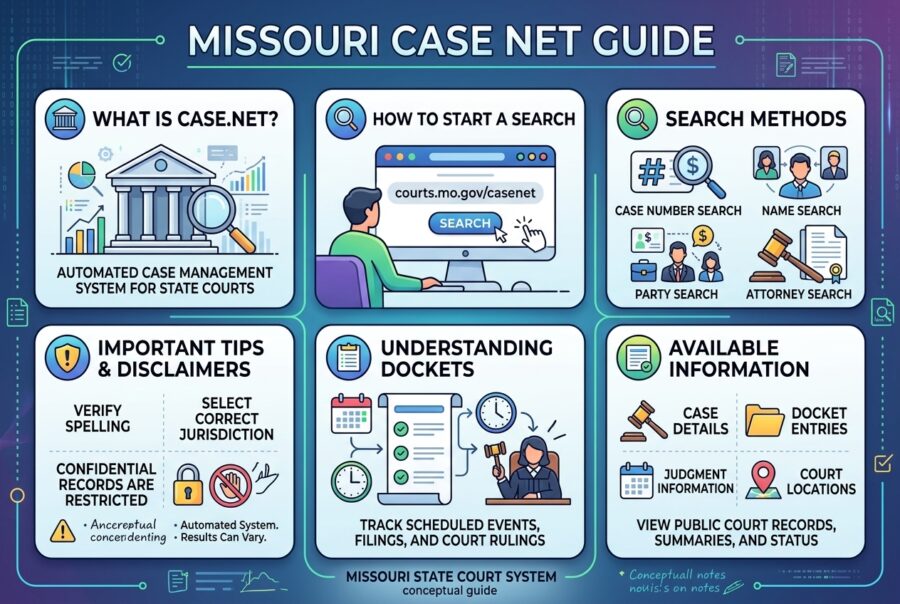
Missouri Case.net is the official free online portal for searching public case information from participating Missouri state courts.
Run through the Missouri courts system, it lets anyone look up cases by name, case number, filing date, hearings, or judgment index — without paying a third-party people-search site.
If you need a docket, upcoming hearing date, party list, or basic disposition, Case.net is usually the first stop. It is not a full substitute for certified court copies, federal PACER records, or confidential case types.
Key Takeaways:
- Case.net is Missouri’s official public court case search portal
- Search by name, case number, filing date, hearings, or judgment index
- Free for basic public access via official channels
- Remote documents are more available for newer public filings
- Sealed, juvenile, expunged, and federal matters are outside scope
- Always verify critical facts beyond a quick screen read
- Avoid unofficial lookalike sites as your source of truth
Background: What Case.net Is (and Is Not)?
Case.net is Missouri’s public-facing court case inquiry system. It provides access to information from circuit and associate circuit courts across the state for many civil, criminal, family, probate, traffic, small claims, and related matters.
Important framing from the courts:
- Case.net is offered as a public service
- Information online is not the official court record in the formal sense used for certified legal reliance
- Only information open to the public appears
That means Case.net is excellent for orientation and monitoring — and still requires care when stakes are high (employment decisions, litigation strategy, formal filings).
Official access path: start from the Missouri Courts website and use the official Case.net search entry points (courts.mo.gov Case.net pages), not lookalike domains that may monetize confusion.
What You Can Search on Missouri Case.net?
Public search methods commonly include:
- Litigant Name Search — find cases by person or organization name
- Case Number Search — fastest when you already have the number
- Filing Date Search — browse by date range and location
- Scheduled Hearings & Trials Search — upcoming settings
- Judgment Index Search — judgment-oriented lookup
- Pay by Web — online payment pathway for eligible amounts
Recent interface work has included mobile-friendly redesigns, county-oriented search behavior, and clearer person vs organization name search options.
What a Case Record Typically Shows?
Depending on case type and public status, a case page may include tabs/sections such as:
- Case header / status information
- Parties and attorneys
- Docket entries (chronological case activity)
- Charges, judgments, sentences (as applicable)
- Scheduled hearings and trials
- Service-related information
- Civil judgment details
- Garnishment/execution information in some matters
You can often confirm:
- Whether a case exists
- Who the parties are
- What has been filed or scheduled
- Whether a judgment or disposition is recorded
Documents: The Big 2023 Line
A critical practical rule:
- Public documents filed on or after July 1, 2023 may be available for remote viewing through Case.net in eligible cases
- Older documents may show in the docket but often require viewing at a courthouse public access terminal for the full PDF/image file
Courts have also noted watermarking on remote public documents while preserving official document access through local court terminals.
If your research depends on reading actual motions, petitions, or orders from before that cutoff, plan a courthouse visit or clerk request process.
How to Use Missouri Case.net: Step-by-Step?
A) Search by name (most common)
- Open official Case.net from Missouri Courts.
- Choose Litigant Name Search.
- Select person or organization (if offered).
- Enter last name (required in typical name search flows); add first name to narrow results.
- Choose statewide participating courts or a specific county/circuit location.
- Review result list: case number, parties, court, type, dates.
- Open the case for docket and details.
Name tips
- Try spelling variants
- Search with and without middle names/initials
- For names with punctuation (O’Brien style), test alternate forms
- Common names need county filters
B) Search by case number
- Select Case Number Search.
- Enter the full case number exactly as issued.
- Confirm court location if prompted.
- Open the case record.
This is the cleanest method when an attorney, notice, or prior printout already has the number.
C) Search hearings
Use Scheduled Hearings & Trials when you need calendar visibility by relevant filters available in the tool (such as location and date parameters).
D) Judgment-focused research
Use Judgment Index Search when your goal is judgment information rather than full case browsing.
Paying Through Case.net
Case.net includes payment-related pathways for eligible fines/fees. Availability depends on the court and the obligation type. Always confirm you are paying the correct case and amount, and keep confirmation records.
Online payment convenience does not replace checking with the clerk when balances look wrong or multiple cases share similar names.
What You Will Not Find on Case.net?
Case.net is powerful, but incomplete by design and by law.
Common exclusions:
- Juvenile cases (confidential)
- Expunged / sealed records (removed or restricted from public view)
- Certain confidential family/adoption/mental-health matters
- Federal cases (use PACER instead)
- Arrests that never became court cases
- Full official criminal-history RAP sheets (separate state processes)
- Some municipal court matters if the court does not participate in the same public system
If a case “should” exist and does not appear, consider participation gaps, sealing, lag time, spelling, or wrong jurisdiction.
Practical Research Workflow (Pro Method)
- Identify jurisdiction — city/county vs state vs federal.
- Start official Case.net — avoid paid mirror sites as your source of truth.
- Search narrow, then widen — exact case number → full name + county → variant spellings.
- Open every plausible match — shared names are common.
- Read docket newest-first — status changes appear in recent entries.
- Separate “case facts” from “document text” — docket summaries are not full pleadings.
- Verify critical facts with the clerk when making legal, employment, or financial decisions.
- Save case numbers and timestamps for your notes.
This workflow prevents the most expensive mistake: acting on the wrong person’s case.
Common Mistakes and Fixes
- Mistake: Using a lookalike “casenet” website as official
Fix: Enter through Missouri Courts official pages. - Mistake: Assuming no result means no case
Fix: Check spelling, county, sealing/expungement possibilities, municipal participation, and update lag. - Mistake: Treating Case.net as a full background check
Fix: Understand it shows public court cases, not every interaction with law enforcement. - Mistake: Confusing state and federal systems
Fix: Federal matters require PACER. - Mistake: Expecting all PDFs online
Fix: Pre-July 1, 2023 public documents often need terminal/clerk access. - Mistake: Misreading disposition codes under time pressure
Fix: Slow down on judgments, dismissals, suspended impositions, and multi-count outcomes; ask a lawyer when needed. - Mistake: Sharing sensitive screenshots carelessly
Fix: Court data can include addresses and personal details; handle responsibly.
Pros, Cons, and Balanced Assessment
Pros
- Free public access
- Statewide reach across participating courts
- Multiple search methods
- Helpful for hearing dates, docket monitoring, and basic case status
- Increasing remote document access for newer public filings
Cons
- Not every court/document is fully online
- Confidential cases intentionally hidden
- Interface and case-number conventions can confuse first-time users
- Data lag can occur after courtroom activity
- Easy to misidentify parties with common names
Balanced verdict
Missouri Case.net is one of the stronger free state court portals for day-to-day public inquiry. It is a research tool, not an all-purpose truth machine.
Future Trends in Missouri Court Access
Court technology continues to move toward:
- More mobile-friendly public search
- Broader remote document availability for public filings
- Clearer search segmentation (person vs organization, county-centered results)
- Stronger watermarking and access controls for remote files
- Persistent tension between transparency and privacy/safety
Users should expect gradual UX improvements while confidential-case barriers remain firm.
Related Systems and Alternatives Compared
| System / source | What it’s for | Cost model | Best use | Limitation |
|---|---|---|---|---|
| Missouri Case.net (official) | State court public case info | Free search | First stop for MO cases | Not full official certified record |
| Local courthouse terminal/clerk | Complete local files, older docs | Free/view fees vary | Pre-2023 documents, certified copies | In-person process |
| PACER | Federal court records | Per-page/fees framework | Bankruptcy/federal criminal/civil | Not state cases |
| Missouri State Highway Patrol processes | Official criminal history products | Fee-based processes | Formal background needs | Different legal product than Case.net |
| Municipal court sites | City ordinance/ticket systems | Varies | Local tickets/ordinances | May not mirror Case.net |
| Missouri eFiling (authorized users) | Attorney/authorized electronic filing | Filing fees as applicable | Active litigation filing | Not public research substitute |
| Third-party aggregator sites | Convenience wrappers | Often paid/upsells | Quick browsing only | Must verify on official Case.net |
| Recorder of deeds portals | Property/land records | Varies | Real estate chain | Not case dockets |
| Secretary of State business search | Entity registrations | Generally free basic search | Company identity checks | Not court judgments by itself |
| Credit/background vendors | Packaged reports | Paid | HR screening workflows | May miss/misread court nuance |
Who Uses Case.net — and How?
| User type | Typical goal | Best method |
|---|---|---|
| Self-represented litigant | Track own case dates/filings | Case number search + hearing tab |
| Family member helper | Find hearing time | Name + county filters |
| Tenant/landlord researcher | Eviction/civil status | Name/case number + docket reading |
| Small business owner | Judgment/collection context | Judgment index + case docket |
| Journalist/researcher | Public case chronology | Filing date/name + document rules |
| Out-of-state relative | Basic status check | Official portal only |
| Legal professional | Quick public docket scan | Case number first |
| Background-curious individual | Public case presence check | Narrow name + location; avoid overreach |
FAQs
What is Missouri Case.net?
The official online system for searching public Missouri state court case information.
Is Case.net free?
Basic public searching is free on the official system.
Can I see all court documents online?
No. Availability depends on public status and filing date; older documents may require courthouse access.
Does Case.net include federal cases?
No. Use PACER for federal records.
Why can’t I find a case?
Possible reasons include spelling variation, non-participating court, sealing/expungement, confidential case type, wrong jurisdiction, or update lag.
Is Case.net an official court record?
Courts indicate online Case.net information is a public service and not treated as the official court record for all formal purposes.
Can I pay tickets or amounts on Case.net?
Eligible payments may be available through Pay by Web features; confirm case details before paying.
How current is the data?
Many updates appear relatively quickly after court activity, but delays can happen; critical deadlines should be confirmed with the court.
Conclusion
Missouri Case.net is the correct free starting point for public Missouri state court case research. Use official court pages, search with precise identifiers whenever possible, understand document-date limits, and verify high-stakes conclusions through clerks or counsel.
Transparency is powerful. Accuracy is more powerful.
Quick Summary
Missouri Case.net lets the public search participating state court cases online for free by name, number, date, hearings, and judgments. Use the official courts portal, expect limits on confidential and older documents, and confirm important details with the court when necessary.
Short Content Disclaimer
This article is general public-information guidance, not legal advice. Court procedures, available data, and online features can change. For case strategy, deadlines, or rights determinations, consult a licensed Missouri attorney or the clerk of the relevant court.
Authority sources:
Details in this guide are based on Missouri Courts Case.net help/public access materials and widely published practical explanations of search methods, document-access timelines, and record limitations. Always rely on the live official Case.net interface and local clerk instructions for the most current process.
Source: courts.mo
Visit More
Julian Thorne is the founder of Vault Magazine and writes about culture, design, and thoughtful living.
The best laptop reviews every year exist to cut through marketing noise and answer one practical question: which machine fits real work, travel, and budget right now.
Annual roundups from major labs compare performance, battery life, displays, thermals, build quality, and increasingly on-device AI capability — then sort winners by use case rather than hype.
Key Takeaways:
- Annual laptop reviews reset because platforms and panels change quickly
- Category winners matter more than a single overall champion
- Battery and sustained performance testing beat brochure specs
- Apple, Snapdragon, Intel, and AMD serve different strengths
- RAM/storage configuration can matter more than a CPU tier bump
- OLED and AI features are valuable only when matched to real use
- Verify review dates and tested configs before buying
If you only read launch-day headlines, you will overpay for the wrong chip or underbuy the wrong screen. If you understand how yearly reviews are built, you can translate any “best of” list into a decision that still makes sense six months later.
This guide explains how annual laptop reviews work, what changed in the 2026 cycle, how to read benchmark claims, and how to match categories to your actual life.
Background: Why Laptop Reviews Reset Every Year?
Laptop hardware moves in seasonal waves:
- New CPU/NPU platforms from Intel, AMD, Apple, and Qualcomm
- GPU refreshes for gaming and creation
- Display transitions (IPS to mini-LED/OLED, higher refresh, better HDR)
- Chassis redesigns focused on weight, repairability, and ports
- OS features tied to AI accelerators (Copilot+ class PCs, Apple Intelligence workflows, local LLM use)
Because of that cadence, a “best laptop” crown is temporary. A model that led last autumn can be mid-pack after a spring silicon launch. Serious review sites therefore republish category leaders throughout the year and run full annual or seasonal best-of guides.
The value is not a single ranking. It is a tested map of trade-offs.
What “Best Laptop Reviews Every Year” Actually Measure?
Strong yearly reviews usually score across these pillars:
- Sustained performance — not only peak benchmark spikes
- Battery life under mixed use — web, video, light create, AI tasks
- Display quality — brightness, contrast, color, reflectivity, PWM/flicker behavior
- Thermals and noise — can it hold speed without becoming a desk heater?
- Keyboard, trackpad, webcam, speakers — daily-driver comfort
- Build, ports, and serviceability
- Value at street price — configuration reality, not just base SKU
- AI/NPU usefulness — local inference, efficiency, software support where relevant
In 2026, many ranking systems also emphasize workload fit: how a laptop behaves in LLM throughput, creative exports, or all-day unplugged office use, not just synthetic scores.
The 2026 Platform Landscape in Plain Language
Annual reviews only make sense if you know the major camps:
Apple Silicon (MacBook Air / Pro lines)
Still elite for efficiency, display-system integration, and sustained performance in macOS workflows. Best when you live in Apple’s app ecosystem.
Qualcomm Snapdragon X / X2 class (Windows on Arm)
Major battery and thermals story. Strong for thin AI PCs and long unplugged days. Compatibility has improved, but specialty x86 software still deserves a personal checklist.
Intel Core Ultra generations (including efficiency-focused and higher-power variants)
Broad software compatibility, competitive integrated graphics in newer families, and wide OEM variety from ultraportables to creator machines.
AMD Ryzen AI families
Often strong multi-core value and competitive AI PC positioning, especially in balanced or performance thin-and-lights.
Discrete GPU machines (NVIDIA GeForce RTX mobile, workstation variants)
Still required for serious gaming, 3D, and heavy GPU-bound creation. Reviews separate these from ultraportable winners for a reason.
There is no universal champion chip — only best-fit platforms.
How Top Review Sites Build Yearly Rankings?
Although methods differ, credible labs tend to share habits:
- Controlled battery scripts (video playback, productivity loops, mixed browsing)
- CPU/GPU benchmarks plus longer sustained runs
- Display measurements (brightness, color coverage, uniformity)
- Noise and temperature logging under load
- Hands-on keyboard/trackpad scoring
- Configuration notes (RAM soldered vs expandable, SSD speed, screen options)
The best annual articles then split winners by category:
- Best overall
- Best ultraportable
- Best battery life
- Best for students
- Best for business
- Best creator laptop
- Best gaming laptop
- Best 2-in-1 / OLED pick
- Best value
If a site publishes only one “winner” with no use-case lanes, treat it as entertainment, not guidance.
Category-by-Category: What “Best” Means
- Best overall
Usually the machine that balances speed, screen, battery, and build with the fewest painful compromises. - Best for most people
Often a mid-to-upper ultraportable with excellent battery and a great keyboard — not the most expensive workstation. - Best OLED laptop
Prioritizes contrast and color. Reviewers increasingly check burn-in mitigations, brightness in bright rooms, and battery impact of OLED panels. - Best business laptop
ThinkPad-class durability, ports, manageability, keyboard excellence, and warranty ecosystem matter as much as raw benchmarks. - Best creator laptop
Color-accurate displays, RAM headroom, cooling that survives exports, and GPU options where needed. - Best gaming laptop
Frame-rate efficiency, sustained GPU power limits, display response, and whether the machine is usable outside games. - Best AI PC
NPU capability, memory bandwidth/capacity for local models, software features you will actually use, and thermals during mixed AI+CPU loads.
Practical Framework: Turn Any Yearly Review Into a Buying Decision
Use this five-step filter:
- List your non-negotiables
Example: 16+ hours real battery, 16-inch screen, 32GB RAM, under 1.5 kg. - Pick your software world
macOS, Windows x86, or Windows on Arm. - Choose a category, not a trophy
Student value machine ≠ creator GPU machine. - Compare street configurations
Base models often ship with slow storage or low RAM. - Validate with two independent reviews
One long-form lab test + one hands-on daily-driver take.
If a yearly “best” list conflicts with your non-negotiables, ignore the crown and keep the methodology.
Actionable Buying Tips for 2026 Shoppers
- Prioritize RAM and storage reality over CPU name generation.
- Read battery methodology — video loop scores are not the same as mixed workdays.
- Prefer matte or well-tuned anti-reflectivity if you work near windows.
- Check whether RAM is soldered before assuming future upgrades.
- For AI features, ask what you will run locally versus cloud-only gimmicks.
- Gaming buyers should inspect TGP / sustained power, not only GPU model numbers.
- Students should optimize for durability + battery + keyboard, not peak Blender scores.
- Wait for multiple reviews after a brand-new platform launch if your purchase is not urgent.
- Track return windows — comfort issues (keyboard, screen glare, fan noise) appear in week one.
- Consider repairability and parts policy if you keep laptops 4–6 years.
Common Mistakes When Using Best Laptop Reviews
- Mistake: Buying the overall winner for a specialized job
Solution: Use category winners. - Mistake: Trusting manufacturer battery claims only
Solution: Rely on standardized lab rundowns. - Mistake: Ignoring chassis thermals
Solution: Two laptops with the same CPU can differ dramatically once fans and vapor chambers enter the picture. - Mistake: Overbuying GPU for office work
Solution: Discrete graphics add heat, weight, and cost. - Mistake: Underbuying RAM on soldered machines
Solution: Configure for the full ownership period now. - Mistake: Assuming Arm Windows runs every legacy app
Solution: Check your critical software and peripheral tools first. - Mistake: Treating last year’s best list as current
Solution: Confirm the review date and platform generation.
Pros and Cons of Following Annual Best-Of Lists
Pros
- Saves research time
- Surfaces category distinctions
- Exposes marketing exaggeration
- Helps track year-over-year progress in battery and displays
- Useful negotiation baseline for price expectations
Cons
- Can over-focus on flagship pricing
- Affiliate incentives exist across the industry
- “Best overall” may not match niche needs
- Early reviews can miss long-term reliability patterns
- Regional pricing and warranty terms vary widely
Balanced verdict
Annual reviews are excellent maps. They are not automatic shopping carts. The smartest readers borrow the testing logic and still personalize the final pick.
Future Trends Reviewers Will Keep Ranking
Expect yearly laptop coverage to put even more weight on:
- On-device AI performance and efficiency under real apps
- Battery life at high brightness on OLED panels
- Sustained performance per watt, not burst scores
- Repairability scores and parts longevity
- Copilot+ / platform feature maturity beyond launch demos
- Quiet cooling as a premium feature, not an afterthought
- Transparent configuration advice (which SKU is actually worth it)
The direction of travel is clear: fewer pure spec-sheet victories, more workload-and-experience victories.
Brand Ecosystem Comparison for Annual Shoppers
| Brand / ecosystem | Typical review strengths | Watch-outs | Best fit |
|---|---|---|---|
| Apple | Efficiency, display/system polish, resale | macOS-only constraint, upgrade limits | Creators in Apple apps |
| Dell (XPS / Latitude) | Design, business options, screens | Config pricing complexity | Premium Windows daily drivers |
| Lenovo (Yoga / ThinkPad) | Keyboards, business durability, variety | Model-name confusion | Work and hybrid users |
| HP (OmniBook / Spectre class) | Battery standouts, AI PC variety | Retail config noise | Endurance-focused buyers |
| ASUS (Zenbook / ROG) | Innovation, gaming depth, OLED options | Lineup sprawl | Creators and gamers |
| Acer (Swift / predator lanes) | Value OLED and AI PC plays | Premium feel varies by tier | Budget-to-mid upgrades |
| Microsoft Surface | Clean design, touch/pen integration | Ports and upgrade limits | Microsoft-centric workflows |
| Razer | High-end gaming screens and chassis | Heat/noise/price trade-offs | Portable gaming priority |
| Samsung Galaxy Book | AMOLED quality, phone ecosystem links | Windows uniqueness vs rivals | Samsung phone users |
| Framework | Repairability, modular upgrades | Peak polish vs big brands | Longevity-first buyers |
Match the Yearly Review Category to Your Situation
| Buyer profile | Review category to trust first | Priority specs |
|---|---|---|
| Student | Best value / best student | Battery, keyboard, weight |
| Consultant / traveler | Best ultraportable | Weight, endurance, build |
| Office professional | Best business | Keyboard, ports, manageability |
| Photo/video creator | Best creator / best OLED | Color, RAM, cooling |
| Competitive gamer | Best gaming | GPU TGP, screen Hz, thermals |
| Developer | Best overall or Pro silicon | RAM, sustained CPU, display |
| AI experimenter | Best AI PC | NPU + memory capacity/bandwidth |
| Budget upgrader | Best under your ceiling price | Real config, not base bait |
| Longevity planner | Repairable / business class | Parts policy, durability tests |
FAQs
Why do best laptop reviews change every year?
New processors, GPUs, displays, and chassis designs reset performance and battery expectations.
Should I always buy the “best overall” laptop?
No. Buy the best match for your software, portability needs, and budget.
Are OLED laptops worth it in yearly rankings?
Often yes for media and creation, if brightness, battery, and burn-in mitigations meet your use case.
Do AI PC labels matter in reviews?
Only if you will use on-device features or local models. Otherwise prioritize battery, screen, and comfort.
How long should a laptop from a current best-of list last?
Many users get 4–6 years from a well-configured machine; soldered RAM and storage choices affect that window.
Is Windows on Arm safe to buy now?
For many mainstream tasks, yes. Verify specialty apps and offline installers before committing.
What is the biggest red flag in a laptop review?
No sustained testing, no battery methodology, and no notes on the exact configuration tested.
When is the best time of year to buy?
Often around major platform launches (when reviews mature) or holiday/back-to-school pricing — but availability beats calendar myths.
Conclusion
Best laptop reviews every year are most powerful when you treat them as a decision system, not a trophy announcement. The right reading order is always: your workload → platform constraints → category shortlist → configuration details → at least two independent test sources.
In the current cycle, battery life, display quality, sustained thermals, and practical AI capability matter as much as classic CPU charts. The winning laptop is the one that disappears into your day — quiet, clear, lasting, and correctly equipped.
Quick Summary
Yearly best-laptop reviews compare real performance, battery life, displays, and design across changing chip generations. Use them to shortlist by category, then choose the configuration that fits your software and portability needs — not just the headline winner.
Short Content Disclaimer
Laptop models, prices, and platform availability change rapidly by region. Benchmarks and battery results depend on configuration and test method. Always confirm the exact SKU, warranty terms, and return policy before purchase.
Authority sources:
This guide synthesizes common methods used in major annual and seasonal laptop roundups, plus widely reported 2026 platform trends across Apple Silicon, Snapdragon AI PCs, Intel/AMD Windows systems, OLED adoption, and workload-based ranking approaches. For a specific purchase, compare two current lab reviews of the exact configuration you plan to buy.
Source: Laptops
Julian Thorne is the founder of Vault Magazine and writes about culture, design, and thoughtful living.


Missouri Case net Guide: How to Search Court Cases Free Online

Classroom Events That Actually Work: Ideas, Planning & Impact
Best Laptop Reviews Every Year: How to Choose With Confidence
-
Vault9 years ago
These ’90s fashion trends are making a comeback in 2017
-
Vault9 years ago
The final 6 ‘Game of Thrones’ episodes might feel like a full season
-
Vault9 years ago
According to Dior Couture, this taboo fashion accessory is back
-
Vault9 years ago
The old and New Edition cast comes together to perform
-
Vault9 years ago
Uber and Lyft are finally available in all of New York State
-
Vault9 years ago
Mod turns ‘Counter-Strike’ into a ‘Tekken’ clone with fighting chickens
-
Vault9 years ago
Phillies’ Aaron Altherr makes mind-boggling barehanded play
-
Vault9 years ago
Steph Curry finally got the contract he deserves from the Warriors